Setting Up TCShare Using Tencent Cloud Function SCF
Preface
Previously, the site's resource sharing was based on oneindex with OneDrive storage, but the link speed of the international version of OneDrive in China is really terrible. The 21Vianet version is fast, but mostly only the Enterprise edition can use it, which is out of the scope of consideration this time.
Since TCShare was upgraded to version 3.0, it has also added support for HeCaiYun, OneDrive, and OneDrive 21Vianet version. Coupled with the originally supported Tianyi Cloud Drive, the number of supported cloud drives is enough to choose one from.
Since I am currently a China Mobile user, I use China Mobile's HeCaiYun. The space is sufficient for sharing some things normally, and the most important point is that there is no speed limit, and the connection speed is very fast. It might be one of the few conscientious products of China Mobile.
Setup Tutorial
The setup methods mainly include server setup and Tencent Cloud Function setup. As for server setup, it is very simple: after preparing the files, running composer install completes the installation. Below, I will mainly talk about the setup method for Tencent Cloud Function SCF.
Why choose Tencent Cloud Function? Tencent Cloud Function has a fixed free quota every month, plus the API gateway's first 1G of traffic per month is free in the first year, which is completely sufficient for personal use.
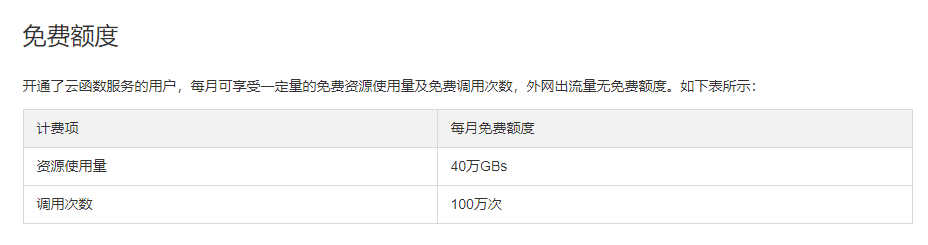
Tencent Cloud Function Free Quota
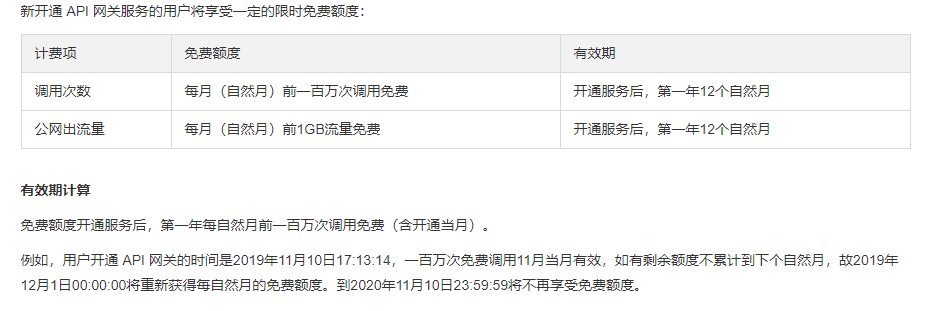
API Gateway Free Quota
However, this service is not completely free, please pay attention to official announcements and the remaining free quota when using it.
1. Download the Source Code Locally and Install Dependencies
The original author stopped updating and deleted the code for some reasons, only keeping the release. For installation instructions, you can check my fork page.
After downloading the release source code from Github, install php and composer locally. For the relevant installation packages of php and composer, see here. You can also complete the composer dependency installation on your own server, and then download the folder with the dependencies installed.
First extract php, then open composer_setup.exe, manually select the just extracted php.exe, and proceed with the installation.
After the installation is complete, use the cmd command to enter the folder where the source code is located, and enter the command:
composer install
2. Create SCF
Go to Tencent Cloud Function, create a new function in the function service on the left, you can select the region at the top, select PHP7.2 as the runtime environment when creating, and select Blank Function as the method.
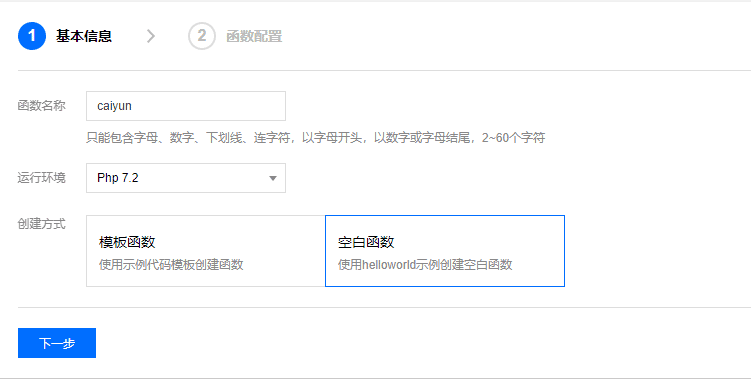
Cloud Function Creation
The execution method is index.main_handler, the submission method is to upload a local folder, select the folder just now and submit it.
Click on Advanced Settings, enter the environment variables, the relevant settings are as follows, it is recommended to go to Github and read the documentation carefully:
## Tianyi Cloud and OneDrive Part

#   XS is the prefix
#   | -KEY is the configuration type, options are KEY, APP, SEC
#   | | - -ct is the key's ID (similar to config.php)
#   | | - | - something is the configuration name
#   | | - | - | - - - - value is on the right side of the equals sign
#   XS_KEY_ct_something=value

    #Tianyi Cloud Configuration
    XS_KEY_ct=ctyun   # Required, value is ctyun
    XS_KEY_ct_FD=     # Application folder name
    XS_KEY_ct_AK=     # AK
    XS_KEY_ct_SK=     # SK
    #Onedrive Configuration
    XS_KEY_od=onedrive
    #21Vianet Configuration
    XS_KEY_od=onedriveCN

#   The part after APP can be any value, usually just 123456 and so on
#          ↓
    XS_APP_1=/              # Mount path
    XS_APP_1_NAME=TCShare   # Cloud drive name
    XS_APP_1_THEME=mdui     # Interface theme
    XS_APP_1_BASE=/         # Path inside the cloud drive
    XS_APP_1_KEY=ct         # Corresponds to the Key ID above

## HeCaiYun Part

XS_KEY_cm=caiyun
XS_KEY_cm_TOKEN='{"cyToken":"******|*|RCS|******|******","encryPhone":"******"}'
XS_APP_<id>_NAME="TCShare HeCaiYun"
XS_APP_<id>_THEME=mdui
XS_APP_<id>_BASE=/
XS_APP_<id>_KEY=cm
XS_APP_<id>=/caiyun
The left side of the equals sign is the key, and the right side is the value. It should be noted that if you are using HeCaiYun, do not fill in the TOKEN in this step, and remove the quotes around NAME.
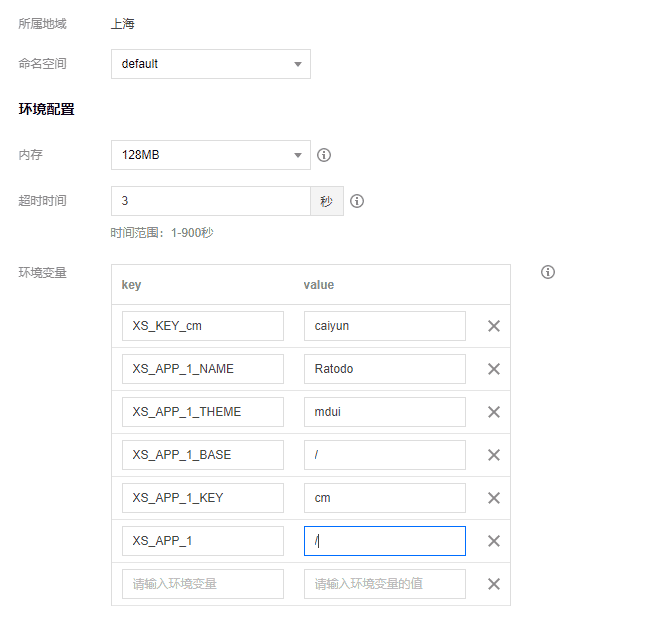
Environment Variable Settings
After the creation is complete, edit the function, and then fill in the TOKEN. Note that the single quotes around the TOKEN's value need to be removed.

TOKEN Settings
Select the trigger method above and add a trigger method, as shown in the figure below.
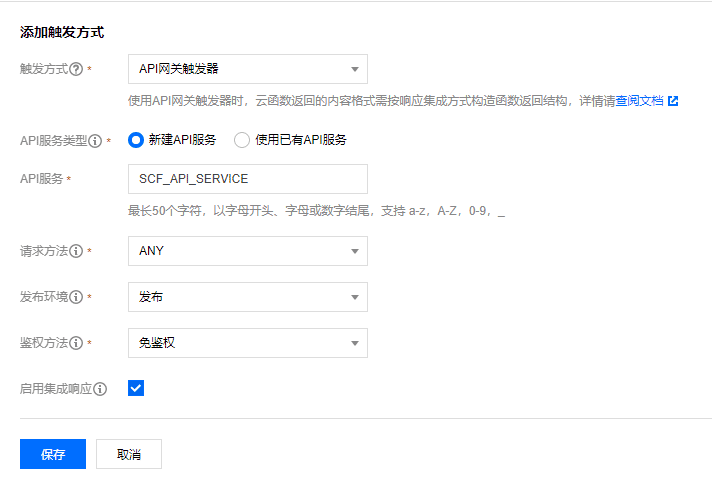
Trigger Method Settings
Get the access path and open it first to see if there are any problems. If there are no problems, proceed to the next step.
3. Set Up API Gateway
Go to API Gateway, on the left service, there is already a service, click the service name to enter the settings.
Click Custom Domain Name, enter your domain name and upload the certificate. If you do not enable https, you do not need this step. Set the others as shown in the figure below.
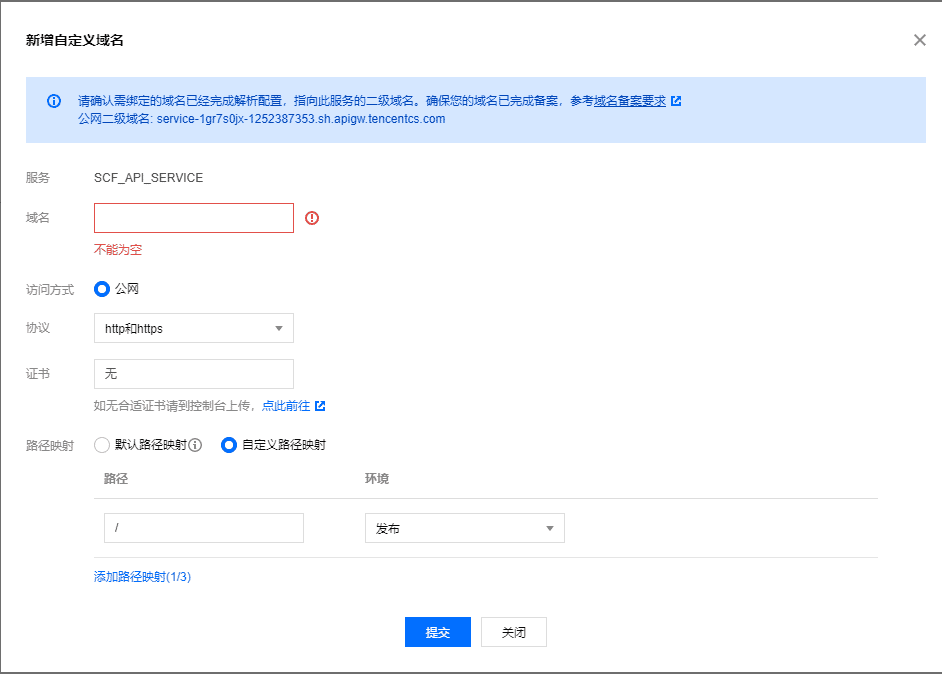
API Gateway Settings
After adding, select Manage API, edit, change the path to /, check Enable Response Integration, select HTML as the return type, finish, and publish.
4. Return to SCF to Modify Environment Variables
The last step is to return to the cloud function and add a new environment variable:
scf_base=/
At this point, you can access it by entering the domain name.
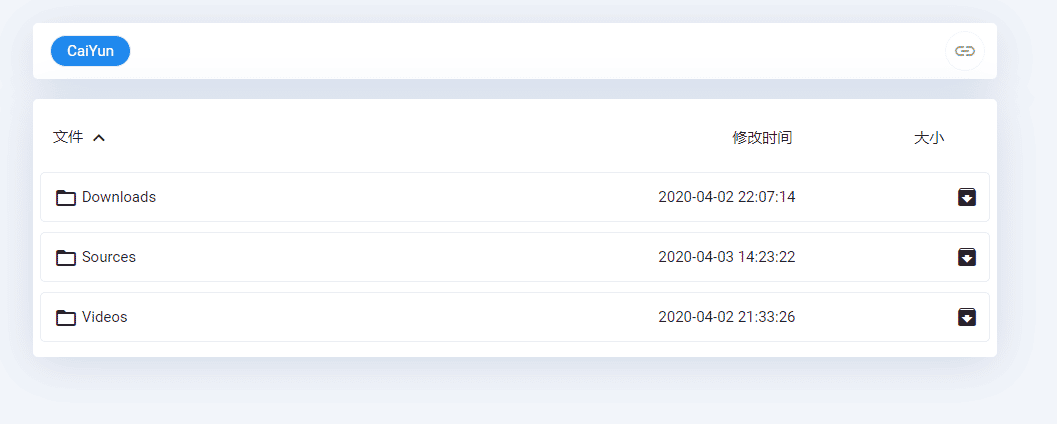
Setup Successful Page
At this point, setting up TCShare with SCF is entirely complete.
Summary
This article takes setting up HeCaiYun as an example. Setting up Tianyi Cloud Drive is the same. You can find the AK and SK by searching on Github~
Personally, I feel that TCShare is already highly complete overall. Thanks to the original author for their efforts!
Emphasizing again, SCF and API Gateway are not free products. You should pay extra attention when using the free quota.
Through this program, you can call resources such as audio and video in the cloud drive within articles.
Reference Articles
TCShare: Cloud Drive Directory Listing, Supports Tianyi Cloud